
|
|
How to Give a Role Permission to Generate Standard Reports
Perform this instruction only if the role that will be used has not been given permission to use the Standard Reports screen. If the prior configuration was made, skip this section
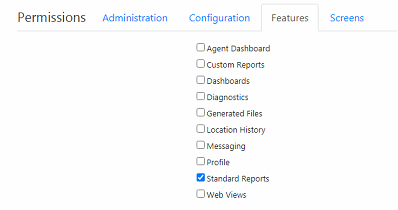
Administrators can select which roles will have access to the Standard Reports screen by enabling the 'Standard Reports’ feature for the role. However, this does not grant the role the right to view any of the Standard Reports created. Granting a role permission to generate a specific Standard Report is done on the Manage Standard Reports screen.
To allow a role to access the Standard Reports screen:
-
On the menu bar, click the
 menu icon, select Roles, and click the Role to be given permission.
 -
Under Permissions, click the Features tab and mark the Standard Reports checkbox.
-
Click Save on the menu bar.