
|
|
How to Export a Custom Report as PDF File
Users can generate a PDF file of a saved custom report that will be displayed in separate tab. Exported files follow the file naming format: <custom-report>-<custom-report>-<yyyymmdd>-hhmm.pdf (e.g., custom-report-20200807-0913.pdf).
 |
Ensure that pop-ups are allowed for the PowerForm site.
|
To generate a PDF file of a custom report:
-
Click the Menu icon on the menu bar and click Custom Reports.
-
Do one of the following:
-
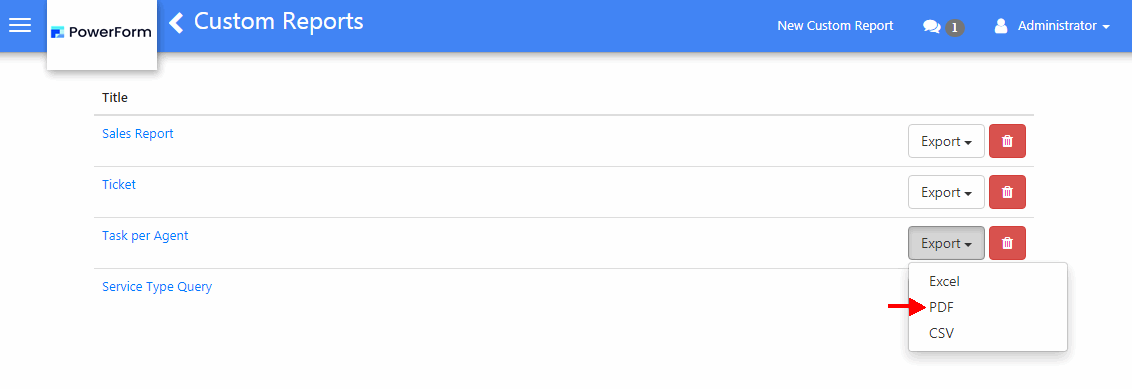
In the reports grid, click the Export button and select PDF from the list.
-
Click on the Title of the report to open it, then click the More button and select Save as PDF.
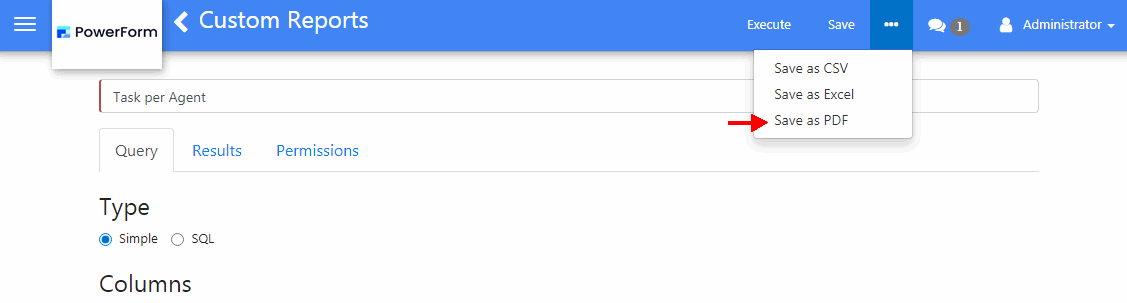
4. In the Save As screen, select a location for the report and click Save.