
|
|
How to Export a Custom Report as Excel File
Custom reports can be exported as an Excel file. All columns available in the report will be included in the exported file. Exported files follow the file naming format: <custom-report>-<yyyymmdd>-hhmm.xlsx (e.g., custom-report-20200807-0913.xlsx).
To export a custom report as CSV:
1. Click the Menu icon on the menu bar and click Custom Reports.
2. Do one of the following:
-
In the reports grid, click the Export button and select Excel from the list.
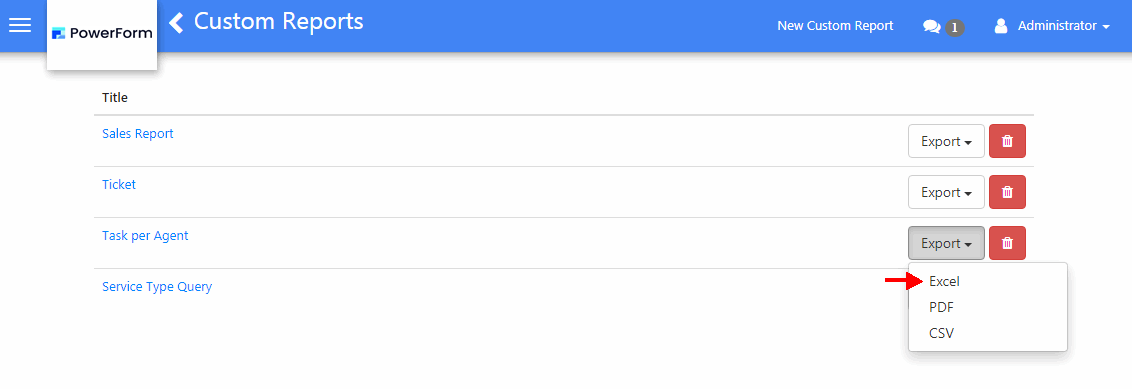
-
Click on the Title of the report to open it, then click the More button and select Save as Excel.
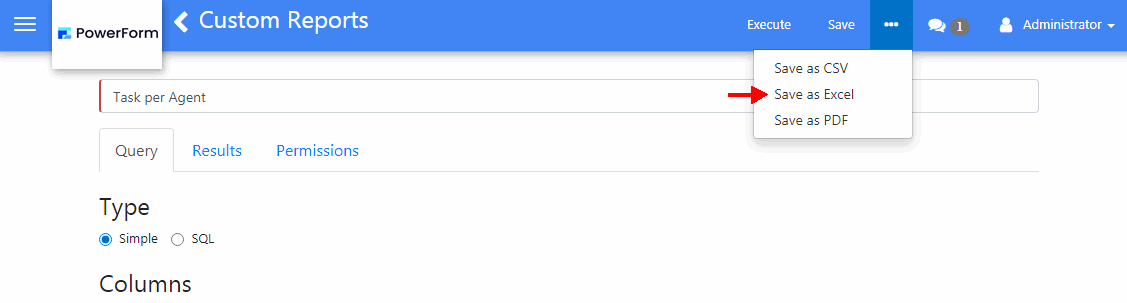
3. In the Save As screen, select a location for the report and click Save.